The way we design web applications is changing rapidly. What once required hours of wireframing, component planning, and interface development can now begin with something as simple as a text prompt.
AI UI generation is transforming how designers, developers, startups, and businesses turn ideas into professional web application interfaces.
Instead of starting with a blank canvas, you can describe your product, explain its features, define a visual style, and let AI generate an initial UI concept in minutes.
But is AI UI generation really changing the future of web design? Let's explore how it works, its benefits, limitations, and how to use it effectively.
What Is AI UI Generation?
AI UI generation is the process of using artificial intelligence to convert natural-language instructions into user interface designs for websites, dashboards, SaaS platforms, mobile applications, and other digital products.
For example, instead of manually designing a dashboard from scratch, you could enter a prompt like:
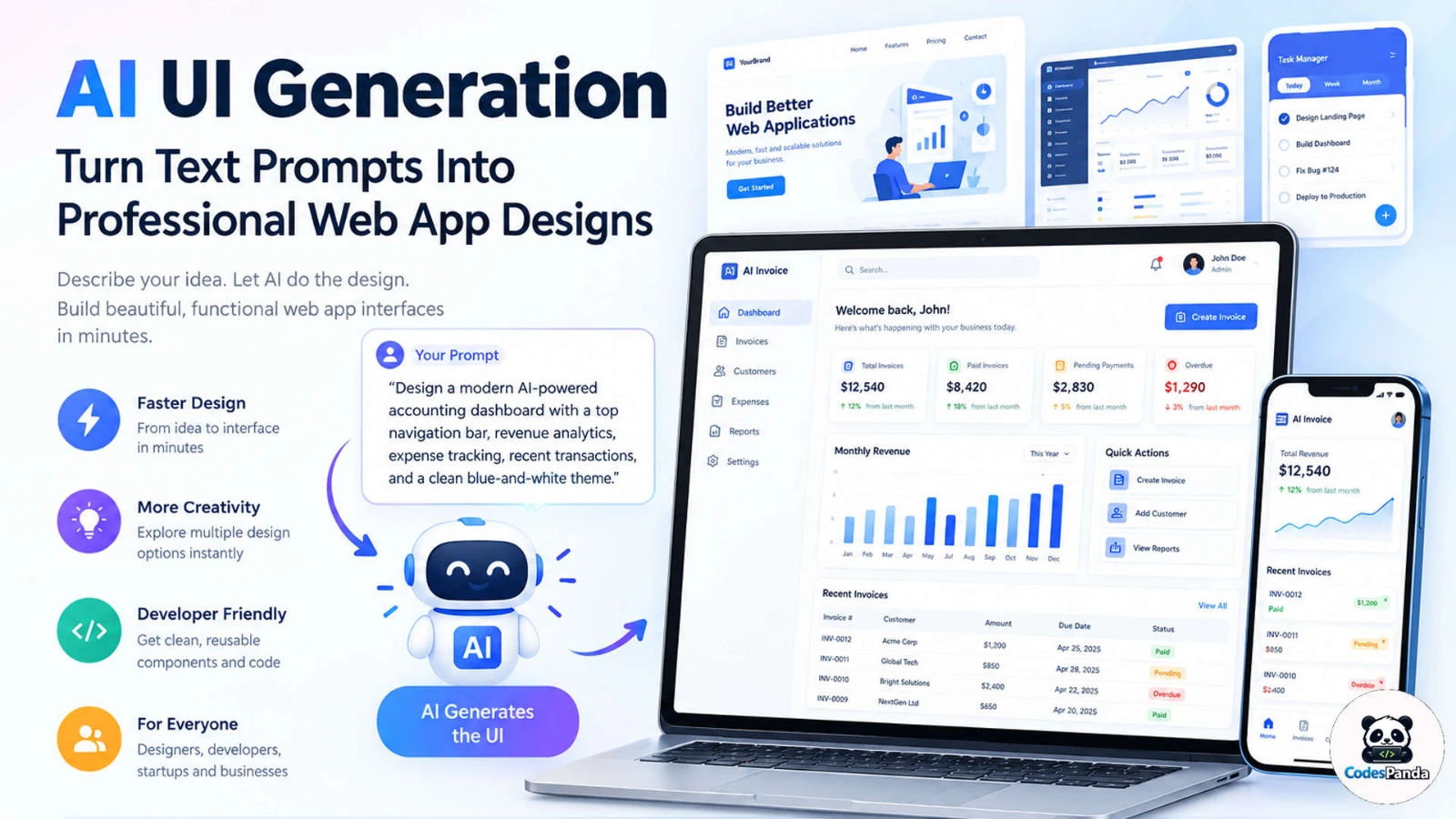
"Design a modern AI-powered accounting dashboard with a top navigation bar, revenue analytics, expense tracking, recent transactions, invoice management, and a clean blue-and-white theme. Use responsive layouts, rounded cards, and professional typography."
An AI design tool can interpret these requirements and generate a visual interface based on your instructions.
Depending on the platform, the output may include:
- Website layouts and landing pages
- SaaS dashboards and admin panels
- Forms, tables, charts, and navigation components
- Mobile application screens
- Design systems and reusable UI components
- Frontend code that can be further customized
Some tools focus on visual design, while others can generate functional prototypes or production-oriented frontend code.
How Does AI UI Generation Work?
The process generally follows five steps.
1. Describe your idea
Start by explaining what you want to build, who will use it, and what problem it should solve.
2. Define the structure
Specify the required pages, navigation, components, and important information. For example, an accounting application might need a dashboard, invoices, customers, expenses, reports, and settings.
3. Generate the interface
The AI interprets your prompt and produces an initial layout, styling, and component structure.
4. Refine the design
You can request changes such as improving spacing, adjusting colors, adding charts, simplifying navigation, or making the layout responsive.
5. Move toward implementation
Depending on the tool, you can export the design, edit generated code, connect backend services, or continue building the application.
The result is a faster starting point for product design—not necessarily a finished, production-ready application.
What Can You Build With AI UI Generation?
AI-generated interfaces can support a wide range of projects.
1. SaaS Dashboards
"Example: Business analytics, CRM, project management, or accounting software."
AI can generate dashboard layouts containing KPI cards, charts, activity feeds, filters, tables, and navigation systems.
2. AI-Powered Web Applications
You can design interfaces for AI invoice generators, resume builders, content generators, chatbots, and intelligent workflow automation tools.
3. Admin Panels
Generate interfaces for managing users, subscriptions, permissions, reports, products, and business operations.
4. Landing Pages
Describe your product, target audience, key features, and desired style to create an initial marketing page with a hero section, feature cards, testimonials, pricing, and calls to action.
5. Industry-Specific Software
AI UI generation can also accelerate interface design for healthcare, education, retail, finance, hospitality, and other industries.
The key is to provide enough context for the AI to understand the actual business workflow rather than simply asking for a beautiful screen.
Writing Better Prompts for Professional UI Designs
The quality of an AI-generated interface depends significantly on the quality of your instructions.
A vague prompt such as "Create a modern dashboard" may produce a generic result.
A detailed prompt provides the AI with a clearer design direction.
Consider this example:
Prompt: AI Invoice Generator Dashboard
"Create a professional, responsive dashboard for an AI-powered invoice generation web application. Use a modern SaaS design with a top navigation bar, a white background, subtle blue accents, clean typography, and consistent spacing.
Include:
- A welcome header with a 'Create Invoice' button
- Summary cards for total invoices, paid invoices, pending payments, and overdue invoices
- A monthly revenue chart
- A recent invoices table with invoice number, customer, amount, due date, and payment status
- Quick actions for creating invoices, managing customers, and viewing reports
- Search, filters, and notification controls
- Clear empty states, loading states, and helpful interface feedback
Use reusable UI components, accessible contrast, realistic sample data, and responsive layouts for desktop, tablet, and mobile. Prioritize usability, visual hierarchy, and a professional accounting software experience."
This prompt gives the AI a much clearer understanding of the interface, its functionality, and its visual direction.
Best Practices for Better Results
To generate more professional designs, keep these principles in mind.
Be specific about the purpose. Explain what the application does and who will use it.
Define the layout. Mention whether you prefer a top navbar, sidebar, split-screen layout, or another navigation pattern.
Set a visual direction. Specify colors, typography, spacing, card styles, and the overall design personality.
Focus on usability. Include search, filtering, clear actions, readable data, error states, and empty states where relevant.
Build incrementally. Generate the main dashboard first, then refine individual pages instead of trying to create an entire complex product in one prompt.
Review the result critically. Check alignment, accessibility, responsiveness, information hierarchy, and consistency across screens.
Think beyond the screenshot. A professional interface should work with real data, different screen sizes, and actual user interactions.
AI UI Generation vs. Traditional UI Design
AI UI generation and traditional UI design are not competing approaches in every situation. They can complement one another.
| Area | AI UI Generation | Traditional UI Design |
|---|---|---|
| Initial concepts | Rapid generation from prompts | Often requires manual setup |
| Iteration | Prompt-driven refinement | Designer-led editing |
| Visual consistency | Depends on instructions and tool | Controlled through design systems |
| Complex workflows | May need substantial refinement | Can be designed around detailed requirements |
| User experience | Requires human evaluation | Benefits from direct UX expertise |
| Implementation | Varies by tool and output | Usually follows a defined design-to-development process |
The strongest workflow often combines AI speed with human design judgment.
Popular Tools for AI UI Generation
Several tools offer different approaches to AI-assisted interface creation.
- Figma AI: AI-assisted workflows within the Figma design environment. Explore Figma.
- v0: Generates web interfaces and frontend code from natural-language prompts. Explore v0.
- Lovable: Helps turn product descriptions into web applications with AI-assisted development. Explore Lovable.
- Bolt.new: Supports prompt-driven application development in the browser. Explore Bolt.
- Uizard: Focuses on AI-assisted UI design, wireframes, and prototyping. Explore Uizard.
The best choice depends on whether you need editable design files, frontend code, interactive prototypes, or a more complete application development workflow.
Limitations You Should Know
AI-generated designs can look impressive in a preview while still requiring significant work before release.
Common challenges include:
- Generic layouts that lack product identity
- Inconsistent components across multiple pages
- Poor handling of complex business workflows
- Accessibility and responsive-design issues
- Generated code that needs cleanup or architectural improvements
- Missing authentication, permissions, data validation, and backend integration
A generated interface is not automatically a secure, scalable, or production-ready application.
Human review remains essential for usability, business logic, accessibility, performance, and maintainability.
The Future: From Prompt to Product
AI UI generation is moving interface creation toward a more conversational workflow.
Instead of translating every idea manually into design elements, teams can describe what they need, evaluate the result, and refine it through successive instructions.
This can help startups validate product concepts sooner, developers reduce repetitive frontend work, and designers spend more time on usability, systems thinking, and product differentiation.
However, the real opportunity goes beyond generating screens.
It lies in connecting AI-generated interfaces with reusable components, real application logic, APIs, databases, testing, and deployment workflows.
The future of web development will not be defined by prompts alone. It will be defined by how effectively people combine AI-generated solutions with technical expertise and thoughtful product design.
Final Thoughts
AI UI generation makes it easier to move from an idea to a visual concept. It lowers the barrier to experimentation and helps teams explore more design directions in less time.
But a good-looking interface is only the beginning. Successful web applications still require a clear understanding of users, thoughtful workflows, consistent design systems, reliable code, and continuous improvement.
My recommendation: start with a small idea, write a detailed prompt, generate your first interface, and refine it until the design reflects a real user need.
AI can accelerate the process. Your product thinking makes the result valuable.
What do you think? Will AI UI generation become a standard part of every web developer's workflow, or will traditional UI design remain essential for professional applications?
Share your thoughts in the comments.
For more, visit https://codespanda.com
#AI #UIDesign #WebDevelopment #ArtificialIntelligence #SaaS #FrontendDevelopment #ProductDesign #AITools #UXDesign
 Written by CodesPandaWe design and build web pages, admin panels and SaaS products in React.Browse templates